Tendsmith’s own automation

From a new enquiry to a booked conversation.

An enquiry can create a surprising amount of administration: reading the message, sending a reply, remembering to follow up and helping someone book a call.

We built automation to handle those routine steps at Tendsmith, with a person taking over for the discovery call.

It’s a working example of the kind of customer administration we can help owners and teams take off their lists.

See what happens below
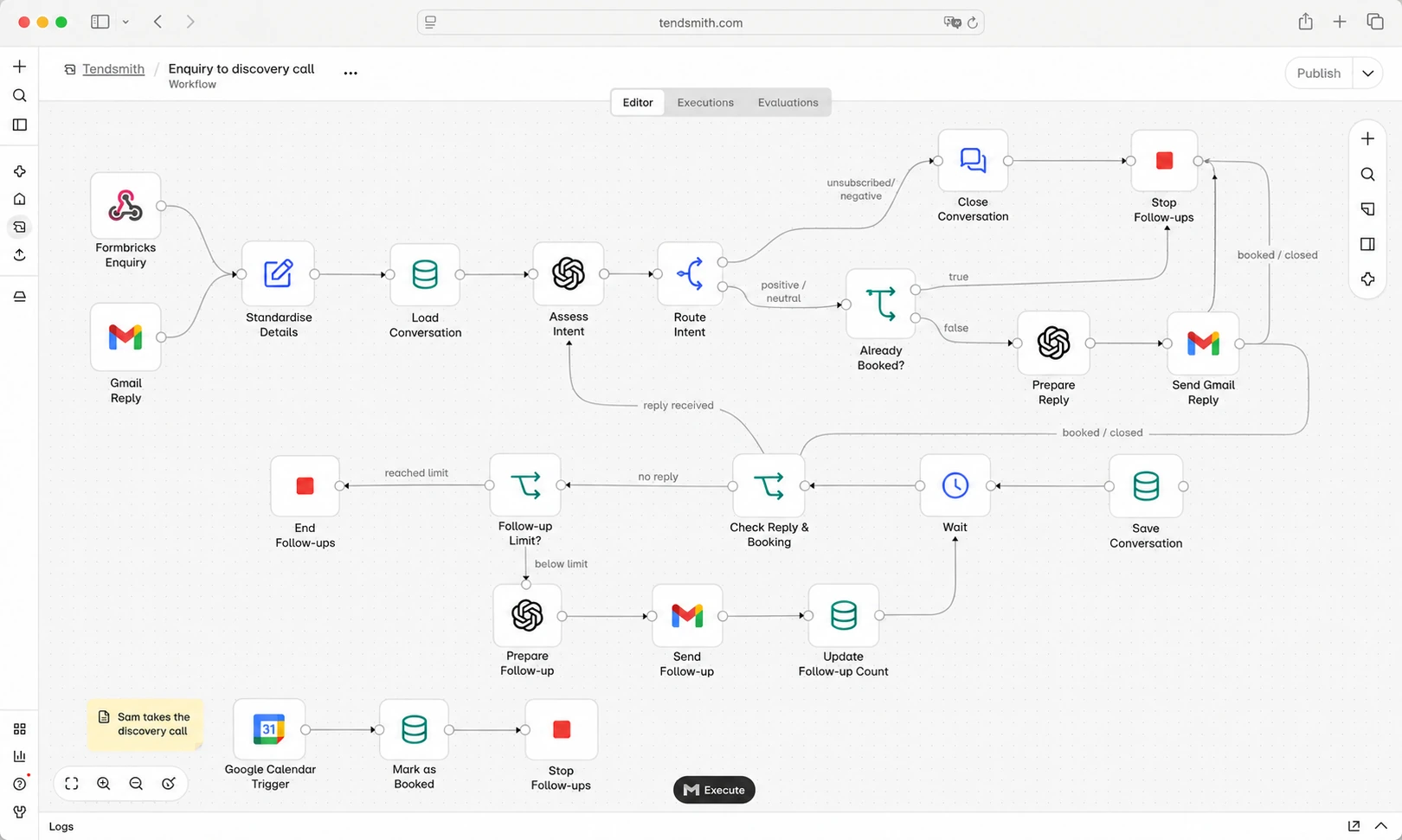
Illustration of Tendsmith’s enquiry workflow: form and email inputs, message assessment, automatic replies, follow-up waits, negative-response stops and discovery-call booking

Illustrative view of the enquiry workflow.

The job that needed doing.

Look after enquiries without managing every email by hand.

When someone gets in touch, the conversation rarely ends with one message.

There may be questions to answer, a booking link to share or a follow-up to send. Someone also needs to remember who has replied, who has booked and who doesn’t want further contact.

Handling each step manually would mean repeatedly checking the inbox and keeping track of the next action.

We connected those steps so the routine correspondence can move forward automatically.

What happens when someone gets in touch?

How the workflow works

  1. Enquiry received
  2. Message assessed
  3. Reply and follow-up
  4. Discovery call with a person
  1. The enquiry starts the conversation.

    The automation receives the enquiry details or an interested reply to an outreach email.

    Those details provide the starting context for the conversation.

  2. The message is assessed.

    The automation uses the enquiry and email conversation to work out the appropriate next step.

    AI helps interpret the message and prepare a relevant response. A clear negative response or opt-out stops further follow-ups.

  3. A reply goes out.

    The response continues the conversation and shares booking information where appropriate.

    The aim is to help someone take the next step without a person having to write every routine email.

  4. Follow-ups happen within agreed limits.

    If there is no reply, the automation waits before sending a follow-up.

    A reply is assessed before the next step. A booking stops booking reminders, and a negative response or opt-out stops further follow-ups. Unanswered messages follow a limited schedule.

  5. A person takes over for the discovery call.

    The call is a conversation with someone from Tendsmith. They ask questions, understand how your business works and discuss whether automation would be worthwhile.

What it takes off the list.

The automation handles routine work that would otherwise need someone to:

  • Read the conversation before preparing the next routine reply.
  • Share the booking link at the appropriate point.
  • Keep track of unanswered messages.
  • Remember when a follow-up is due.
  • Stop reminders once someone has booked or declined.

The administration is automated. The discovery conversation stays personal.

Following up has a stopping point.

A reminder should help someone continue a conversation, rather than keep chasing indefinitely.

The initial follow-up sequence ends if there is no response. A separate process can follow up later at two, four and six months, subject to the agreed contact and retention rules.

Negative replies and opt-outs stop further follow-ups. A confirmed booking ends booking reminders.

The tools behind it.

Each tool has a particular job:

  • n8nWorkflow
  • FormbricksEnquiries
  • OpenAIResponses
  • GmailEmail
  • Google CalendarBooking
Formbricks
Collects enquiry details.
OpenAI
Helps interpret messages and prepare responses.
Google Workspace
Handles email and appointment booking.
n8n
Connects the steps and manages when they happen.

You don’t need to use these tools yourself. A customer project starts with the software, tasks and checks appropriate to that business.

View the workflow illustration →

What this example demonstrates.

This is automation built and used by Tendsmith to handle its own enquiry correspondence.

It shows how several small administrative jobs can become one connected process, with clear rules about what happens next.

It doesn’t establish how much time another business would save. That depends on its enquiry volume, current process and the work involved.

For your business, we start by understanding those details before recommending a build.

What happens after a customer contacts your business?

Does someone copy their details, send an acknowledgement, notify a colleague or remember to follow up?

Tell us how it works today. We’ll help you decide which routine steps could be handled automatically and where your team should stay involved.

No technical knowledge needed. No obligation.

Workflow illustration

Book a free 30-minute call